Whenever we make bigger changes to the code base or clean up old docs, it's important to preserve the old docs for reference. Here's an example: https://v16.docs.2sxc.org/
Note that for this process, the old docs will need to be rebuilt a few times, so that the layout etc. will be modified to show it's an archive.
Build the Archive
- Create a new repo in https://github.com/2sxc-dev/ using a name like 2sxc-docs-v19
Add the Archive - Option 1 (recommended)
Important: This assumes you already have a c:\projects\2sxc\v##\ folder containing the stable, LTS or similar code.
- Copy the entire docs folder in your c:\projects\2sxc-docs\ to
c:\projects\2sxc\v##\2sxc-docs-v##
- Correct git target using
git remote remove origin and git remote add origin https://github.com/2sxc-dev/2sxc-docs-v##.git
- Make sure you change primary git branch to main
git branch -M main
- Rename the workspace to something like
2sxc Docs v## Archive.code-workspace
- Build / Push
Add the Archive - Option 2 (older, should work too)
- Git clone to local - at the same level as the old docs
- probably
c:\projects\2sxc-docs-v19
- ...but if the original code has already changed too much, place it in the correct place with older 2sxc/eav code, so that rebuilds will still take that.
- In the original docs, take the latest (or a previous commit) to get the copy which will be archived; copy all of it into that folder.
- Rebuild, verify it works
Mark the Archive Pages to show they are Archives
We need to make changes to the layout similar to the v16 archive.
Home changes
- Lock beside title
- Info "ARCHIVE 🔒 Documentation" and info under it
- copy from previous archive
- update the text / version numbers in that section
Changes in _master.tmpl
- Before you change _master.tmpl, create
archive.md in the pages like in the v19 (for linking in the menu later - note that the v21 archive has some instructions)
- Version Picker: Change the label of the search, add a 🔒 similar to the v19 master
- Add this note to each page in the
_master.tmpl - (between the <article...> tags)
<article data-uid="{{uid}}">
  <!-- Special archive note header -->
  <div class="alert alert-danger d-print-none">
    These docs are <a href="/archive.html">archived 🔒</a>.
    Go to the
    <a href="https://docs.2sxc.org" target="_blank">latest docs home</a>
    or try if
    <a href="https://docs.2sxc.org/{{_path}}" target="_blank">this exact page is available</a>
    in the latest docs.
  </div>
  {{!body}}
</article>
- Add a
🔒 v## ARCHIVE to the header w/Link similar to v19 and link to the /archive.html
- make sure you adjust the version number in the copied code
Changes to the Build / Template
Change DocFx Build to Disable Edit
- Change the
docfx.json to set disableGitFeatures to true
- also set
_disableContribution to true
- Verify that the build now doesn't have "edit this page" in the footer
- Change the
_appTitle to something like 2sxc Docs v21 🔒
Add a robots.txt to avoid Indexing
- create a
/docs/robots.txt (so directly in the output folder) and add this:
User-agent: *
Disallow: /
Deploy to Pages
- go to the pages configuration like https://github.com/2sxc-dev/2sxc-docs-v21/settings/pages and configure everything
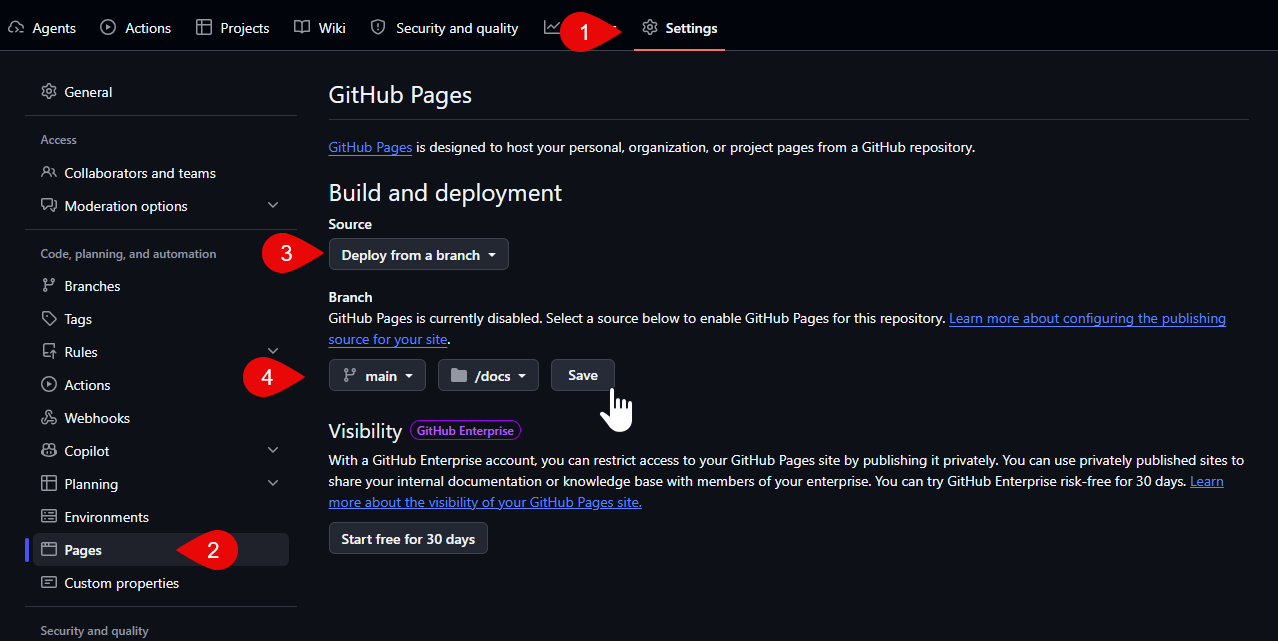
- Save and wait for it to build, this can take a few minutes - you should then see this
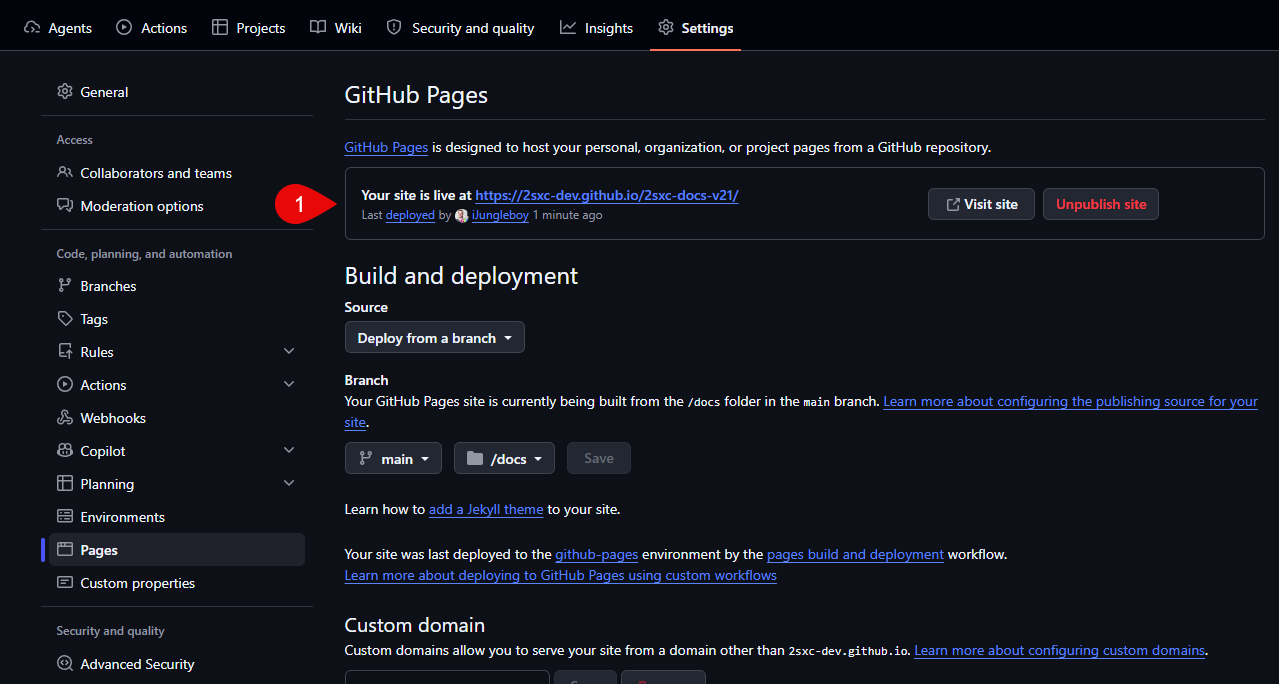
- Then configure the domain vXX.docs.2sxc.org
- setup DNS in cloudflare, CNAME to
2sxc-dev.github.io
- add the domain to the pages settings
- await till it works - can take a while - then set enforce https
- verify that it works
- Set repository to archive, as it should not change and not trigger git-alerts on old npms
Change the main Redirector to also list the old pages
- In the docs-versions.md, copy the section from the previously archived version and update the version number in
- title
- logo
- link
- Build / test